How to Remove the Plumbob in The Sims 4 (With Cheats)
Sometimes you want a screenshot but the plumbob is in the way, well with this sims 4 remove plumbob cheat you can get rid of it!
This lets you take all the gorgeous screenshots without worry!
How to Use The Remove Plumbob Cheat
Doing this is thankfully super easy but you first need to enable cheats. To do this you’ll open the cheat box:
- PC: Ctrl + Shift + C
- Mac: Command + Shift + C
- Console: All Four Triggers
You’ll then type in testingcheats true and hit enter and the game lets you know that the cheats are enabled. Then, you’ll type in headlineeffects off and hit enter.
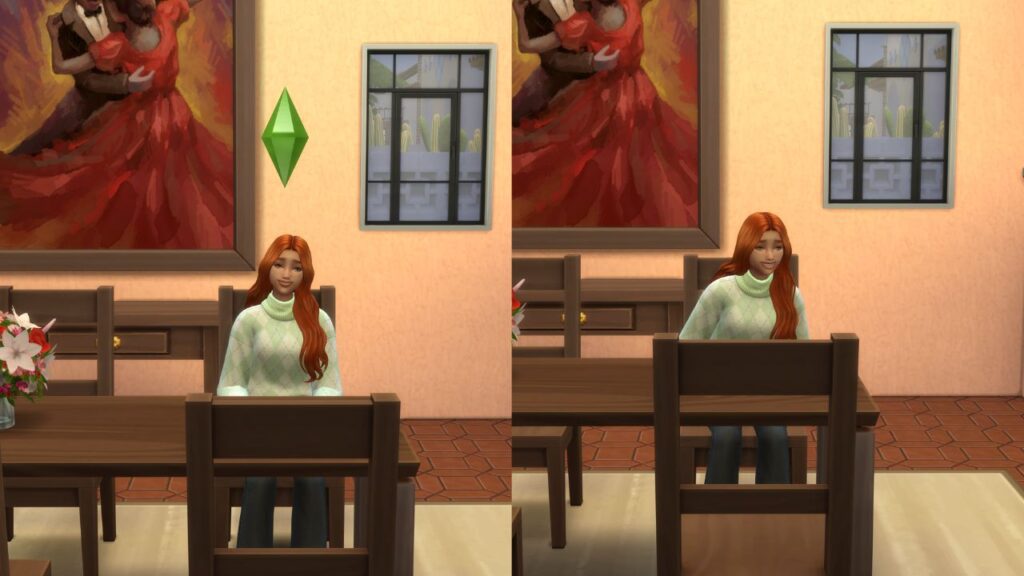
This will get rid of the plumbob on your sim but will also get rid of things like hover information on plants and food that shows spoil times.
| Cheat Effect | Cheat Code |
|---|---|
| Turns off Plumbob | headlineeffects off |
| Turns on Plumbob | headlineeffects on |