The Sims 4 Neighbourhood Action Plan Cheats
NAPs aren’t just a good sleep, they are plans that change the neighbourhood and with these sims 4 neighbourhood action plan cheats you can add them instantly!
These plans come with The Sims 4: Eco Lifestyle and let you do things like put bags on a sim’s head or have everyone lose their clothes.
How to Cheat Neighbourhood Action Plans
First off you’ll need to open the cheat box so you can enable cheat codes and you do that with:
- PC: Ctrl + Shift + C
- Mac: Command + Shift + C
- Console: All Four Triggers
You’ll then type in testingcheats true and hit enter and the game will tell you cheats are enabled.
Once your cheats are enabled you can shift click on either one of the red community boards that are in each neighbourhood or on your sim’s mailbox. On a computer you hold down shift and click on the item, on console you’ll hover over the item and do the following:
- Playstation: Hold down O and Press X
- Xbox: Hold Down B and Press A
When you do this you’ll see the options to either:
- Instant Enact Neighbourhood Action Plan
- Instant Repeal Neighbourhood Action Plan

If you choose to enact you’ll get to pick which NAP you want to have and if you choose repeal you can get rid of one that you already have.
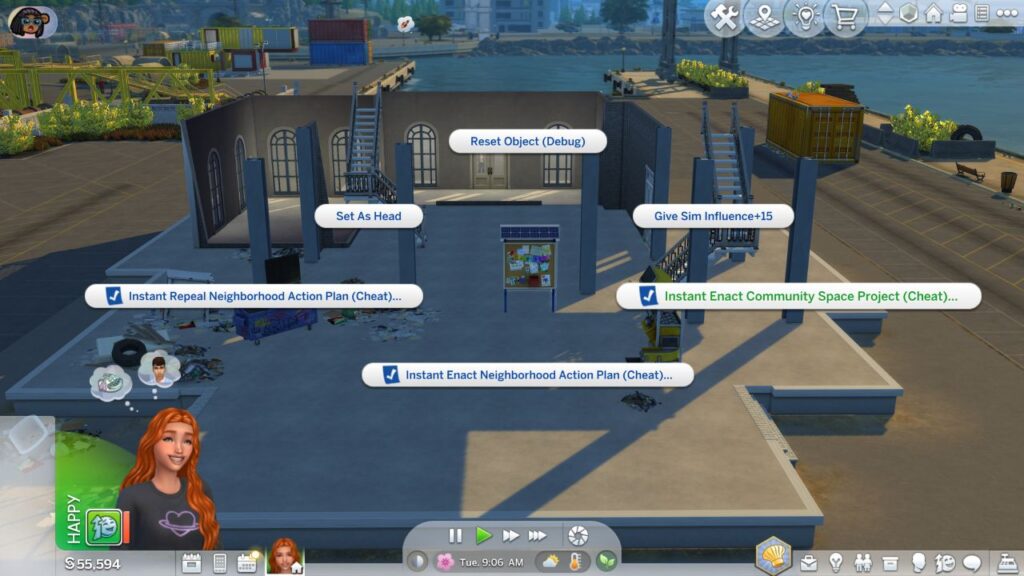
Another thing you can do is go to a community space in each neighbourhood in Evergreen Harbour and shift click on the board there. You’ll see the option to instant enact community space project. This will let you choose between three options:
- Community Garden
- Marktplace
- Maker Space
You’ll get to access this area and use it whenever you want without needing to do it through gaining influence.