How to Disable Luck in The Sims 4
Some players may not want to have their sims day affected by luck, thankfully you can disable luck in The Sims 4!
This just takes a few simple clicks in the game’s settings, so you can do it really quick.
How to Disable Luck in The Sims 4
The first thing you need to do is go to the top right corner of your screen and click the three dots to open up the options menu. Then, you’ll have a pop-up menu appear and you’ll choose game options.

You’ll have a larger menu appear that has lots of pages on the left hand side. You’ll want to go to pack settings and look for the Enchanted by Nature section. If you have lots of DLC in your game you’ll need to scroll to find this!
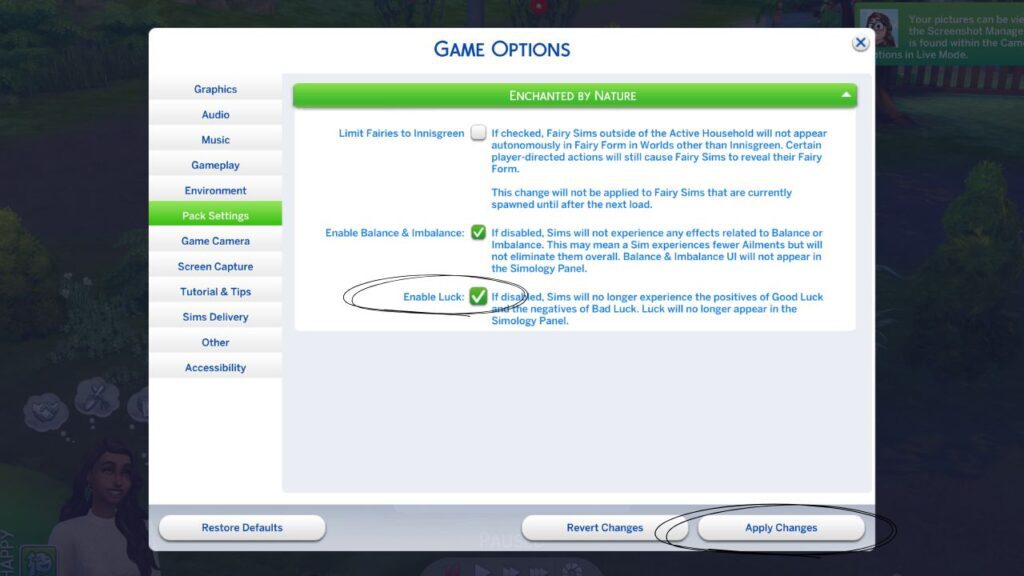
At the bottom of the Enchanted by Nature section you’ll see Enable Luck. If that box is checked then luck is enabled and your sim can be impacted by it.
To disable luck, uncheck that box and then click apply changes and the bottom right hand corner of this menu. You can then close the menu and go about your sim’s life without being impacted by luck at all!
There is so much fun to be had with this pack, so why not go ahead and become a fairy and see what happens?