How to Raise and Lower Items in The Sims 4
If you ever want to place something on a table but can’t you can use the sims 4 raise and lower items cheat to do so.
This is a cheat mixed with a hot key that you lower items like mirrors and raise random items higher.
How to Raise and Lower Items
If you want to raise these items you’ll have to first enable move objects which is easy to do. You’ll open the cheat box with simple commands:
- PC: Ctrl + Shift + C
- Mac: Command + Shift + C
- Console: All Four Triggers
Then you’ll type in testingcheats true and hit enter and then type in bb.moveobjects on and hit enter.
Then you’ll grab the object you want to raise or lower and you can use the 9 key to raise them and the 0 key to lower them.
| Effect | Hot Key |
|---|---|
| Raise Items | 9 key (in number bar) |
| Lower Items | 0 key (in number bar) |
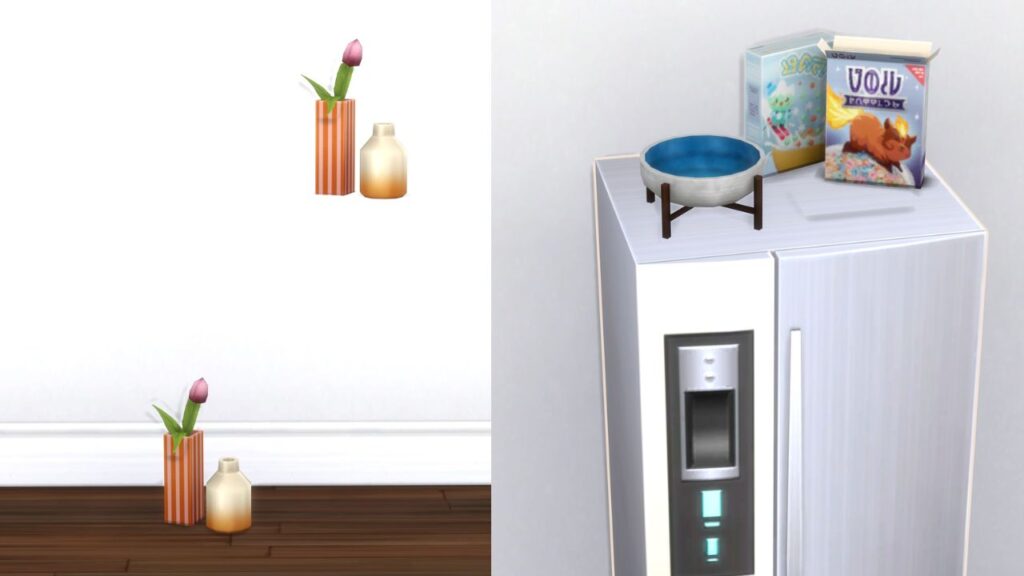
My favourite way to use this hot key is to decorate the top of my sim’s fridge to add items like cereal boxes or other food storage items to make the house feel more lived in.